LeaseLedger

Lease Accounting, Simplified

AASB 16, IFRS 16, and ASC 842

Lease accounting software built for accountants.

Run the register, journals, disclosures, and close support in one secure workspace.

Free plan, no credit card. By creating an account, you agree to the Terms of Service and acknowledge the Privacy Notice.

Accountant-first workflows Secure hosting Optional AI assistance
  • Keep measurement, payments, journals, and disclosures connected
  • Migrate existing books with structured bulk migration, validation, and cutover support
  • Protect every change with controlled access and a complete audit trail
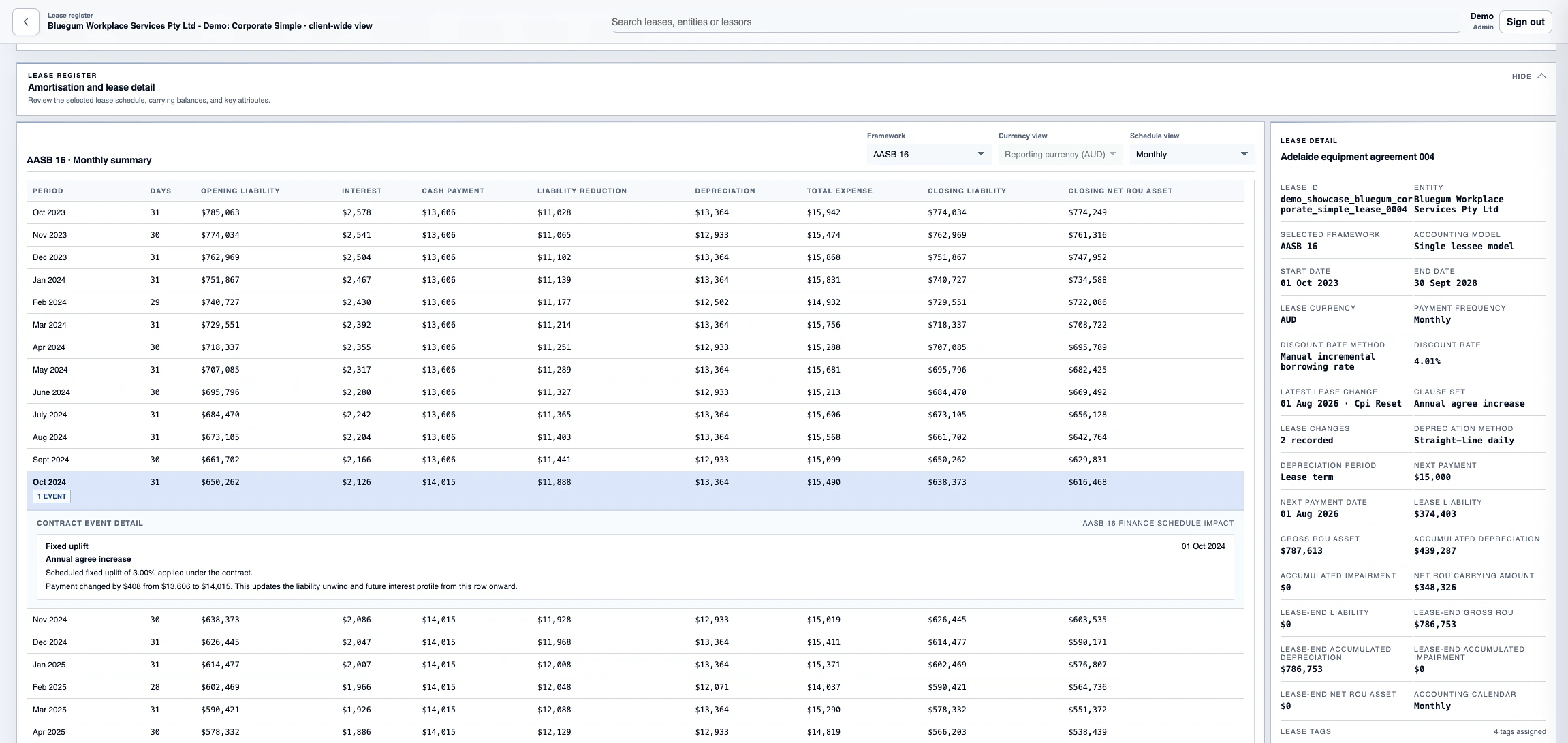
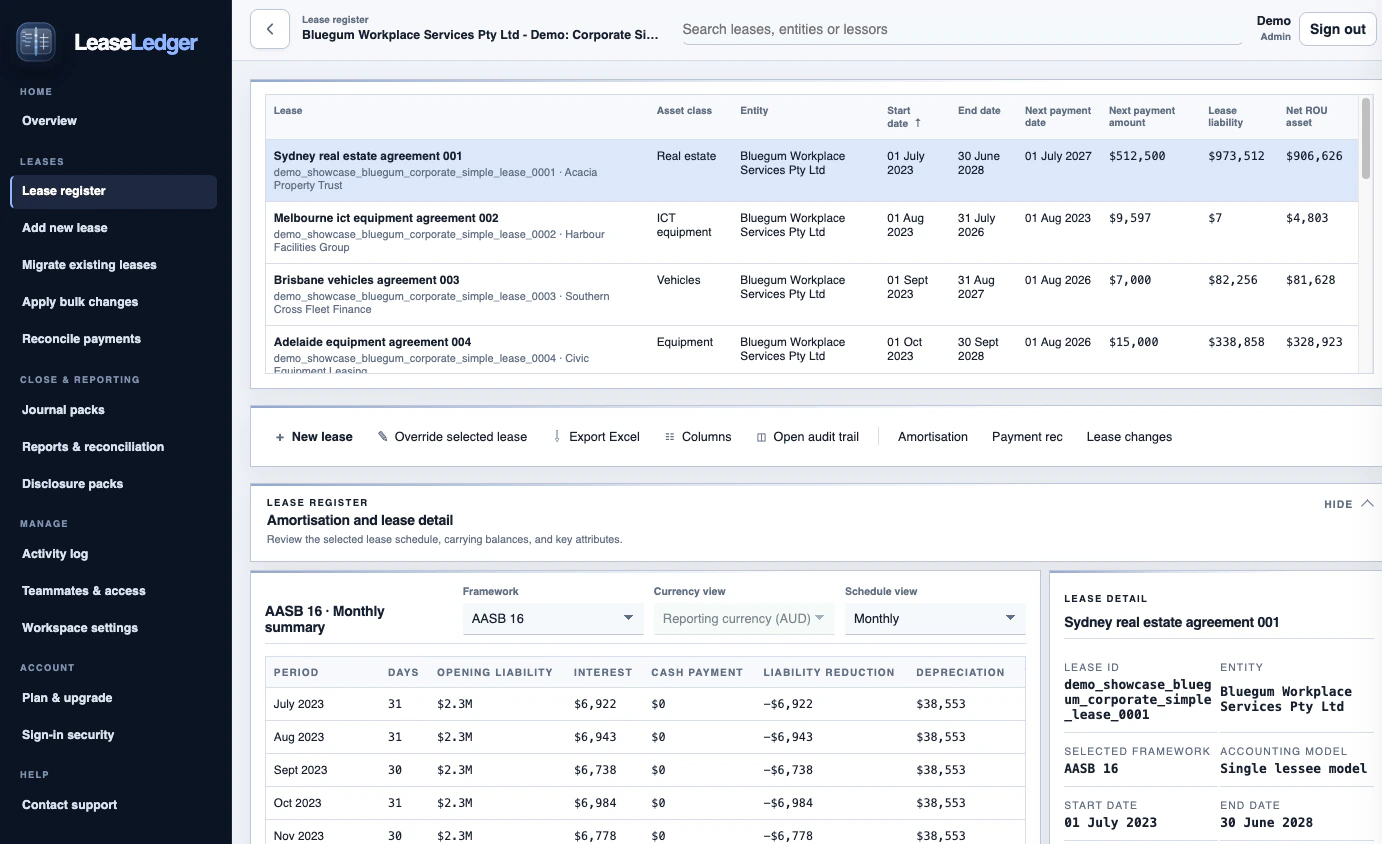
LeaseLedger live demo lease register and amortisation schedule

Built around the way finance teams account for leases

LeaseLedger keeps measurement, operational activity, journals, reporting, and disclosures connected, so teams can work from one source of truth instead of stitching together spreadsheets.

Run the lease register like an accounting book

  • New leases, migrations, modifications, and reassessments
  • Schedules that show the impact of each event
  • Keep interest, depreciation, FX, modifications, and other adjustments tied to each individual lease
  • Store supporting documents securely and keep them linked to the relevant lease
Capture the real-world activity that changes the close

  • Scheduled payment reconciliation and governed lease changes
  • Bulk imports and portfolio-wide updates
  • Saved workflow history and audit support

Take the same ledger into journals and statement support

  • Journal packs and posting controls
  • Reporting and financial-system reconciliations
  • Disclosure workpaper previews and linked supporting evidence

Move faster without handing over the accounting judgement

Use AI when it helps, or leave it off entirely. LeaseLedger can suggest onboarding settings, structure new-lease drafts from text or PDF, and help prepare lease-change drafts. Every result remains a suggestion for human review; the governed calculation engine works only from the data your team confirms.

Turn source material into a structured first draft

Surface suggested dates, payments, options, assumptions, warnings, and follow-up questions from plain-language instructions or a lease PDF.

Use AI to support decisions, not make them

People review and confirm the suggested terms and accounting conclusions before anything is saved or posted to the ledger.

Enable AI only where your organisation wants it

Client administrators can enable or disable AI assistance. Manual capture, calculations, journals, reporting, and controlled workflows continue unchanged when AI is off.

Bring live lease populations onto the platform without losing control

Start with new leases or migrate existing books using structured imports, validation, and clear cutover choices.

Load existing populations with template-driven validation

Use workbook templates for migration leases and new leases, check the data before import, and fix issues before anything reaches the ledger.

  • Bulk migration and bulk new-lease import workflows
  • Preview, validation, and row-level error handling before save
  • Tags, classifications, FX, GL mapping, and key lease fields carried in from source data

Choose the opening basis that fits each portfolio

Continue from source balances or use system-calculated opening values, with the chosen basis carried through schedules, journals, reporting, and disclosures.

  • Keep source balances where the carried-forward basis matters
  • Use calculated opening values where a fresh cutover is preferred
  • See the basis clearly across schedules, journals, and reporting

Roll out in stages and keep the history clear

Onboard entities in stages, validate data before production use, and keep a record of import and cutover decisions.

  • Stage onboarding by client or entity
  • Validation before live use
  • Audit history of imports, cutover decisions, and user actions

Built to keep finance data protected and easy to govern

Security is part of the product and the hosting model. Sign-in, access checks, storage, backups, and audit history are handled as part of the platform rather than left to manual workarounds.

Teams only see the portfolios and actions they need

Access can be limited by client, entity, and task so users work inside the right part of the ledger. Sensitive actions stay behind server-side checks.

  • Scoped access for finance, admin, and reviewer workflows
  • Server-side checks before data is changed
  • Clear history of who changed what and when

Secure sign-in with optional Multi-Factor Authentication (MFA)

Users verify their email address and can enable software-token MFA. Sessions are kept in secure cookies so the browser is not storing reusable sign-in tokens, and write actions are protected against forged requests.

  • Optional software-token MFA
  • Server-managed sessions with secure cookies
  • Checks to stop forged write requests

AWS hosting in your selected region, with dedicated environments available

LeaseLedger can be hosted in the AWS region selected for your organisation. Dedicated single-tenant AWS environments are available by arrangement for organisations with stricter isolation or governance requirements.

  • Regional hosting aligned to your data residency requirements
  • Dedicated single-tenant environments available by arrangement
  • Encrypted database, file storage, logs, and backups
  • Audit logging for sign-ins, exports, postings, and lease changes

See the lease accounting workflow in action

These views come from LeaseLedger's live fictional demo workspace: portfolio position, contract detail, and a guided lease change in one connected flow.

Start from the current close view

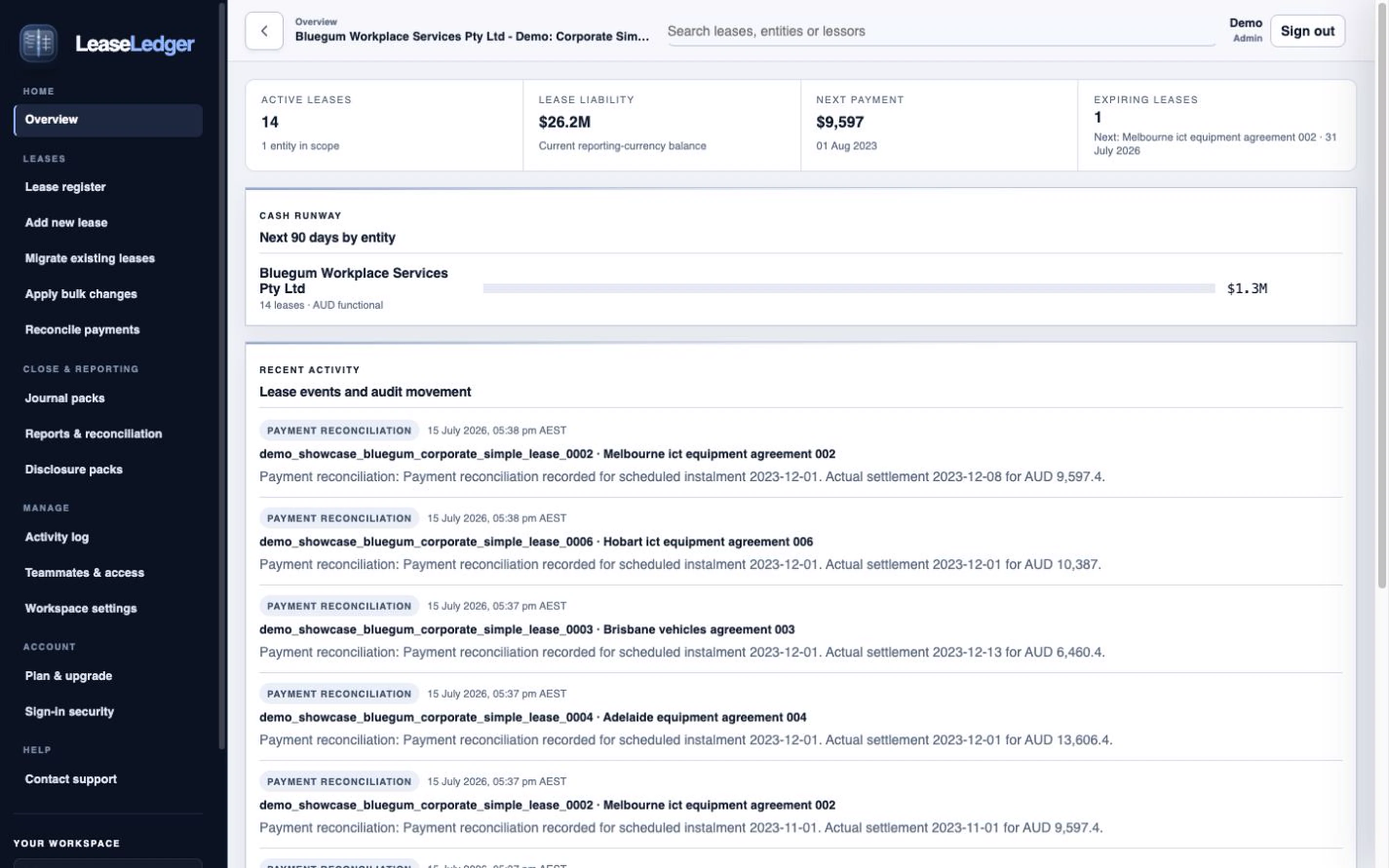
See lease counts, liability, ROU balances, near-term cash, settlement issues, and recent activity before drilling into a contract.

  • Portfolio and entity context in one view
  • Entity watchlists, recent activity, and close-status signals
LeaseLedger live demo portfolio dashboard with lease liability, cash runway, and posting status

Explain every number inside the schedule

Open a lease and move from the amortisation schedule into event detail, payment reconciliation, modifications, and linked close impacts without leaving the register.

  • Event impact summaries across payments, CPI reviews, and remeasurements
  • Flexible schedule views with audit context beside each change
LeaseLedger live demo lease register showing an inline fixed-uplift event and its schedule impact

A guided path to the right accounting treatment

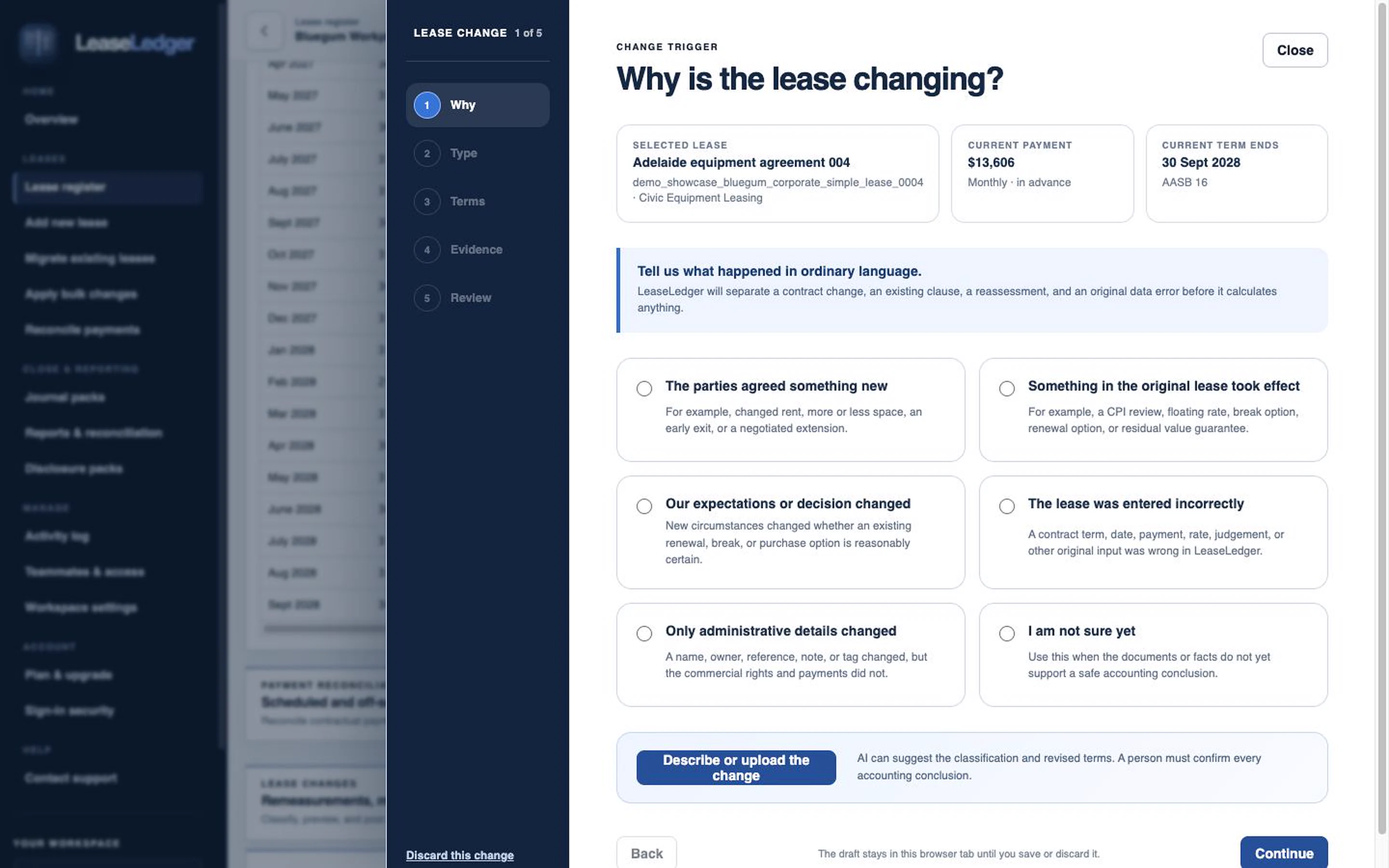
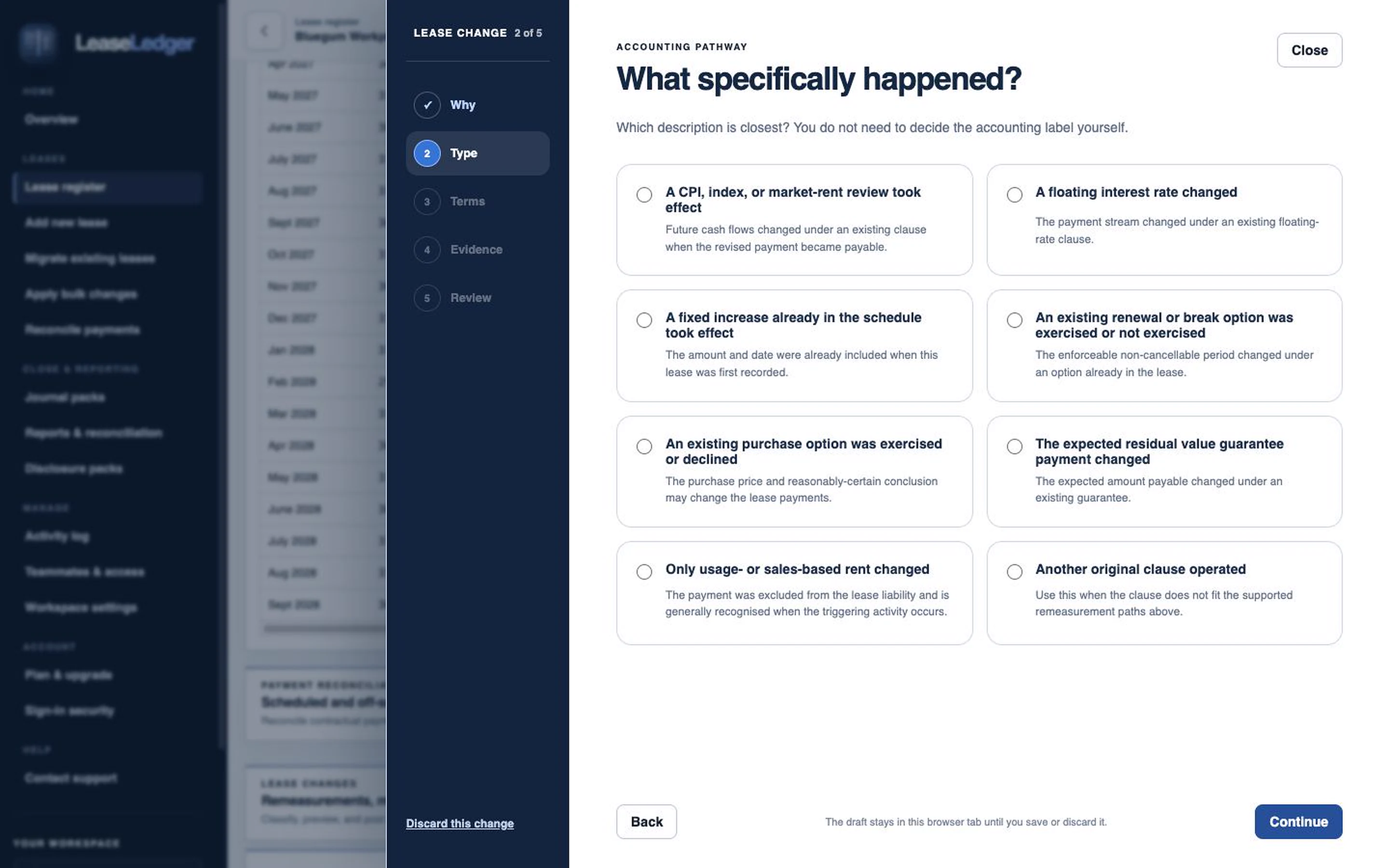
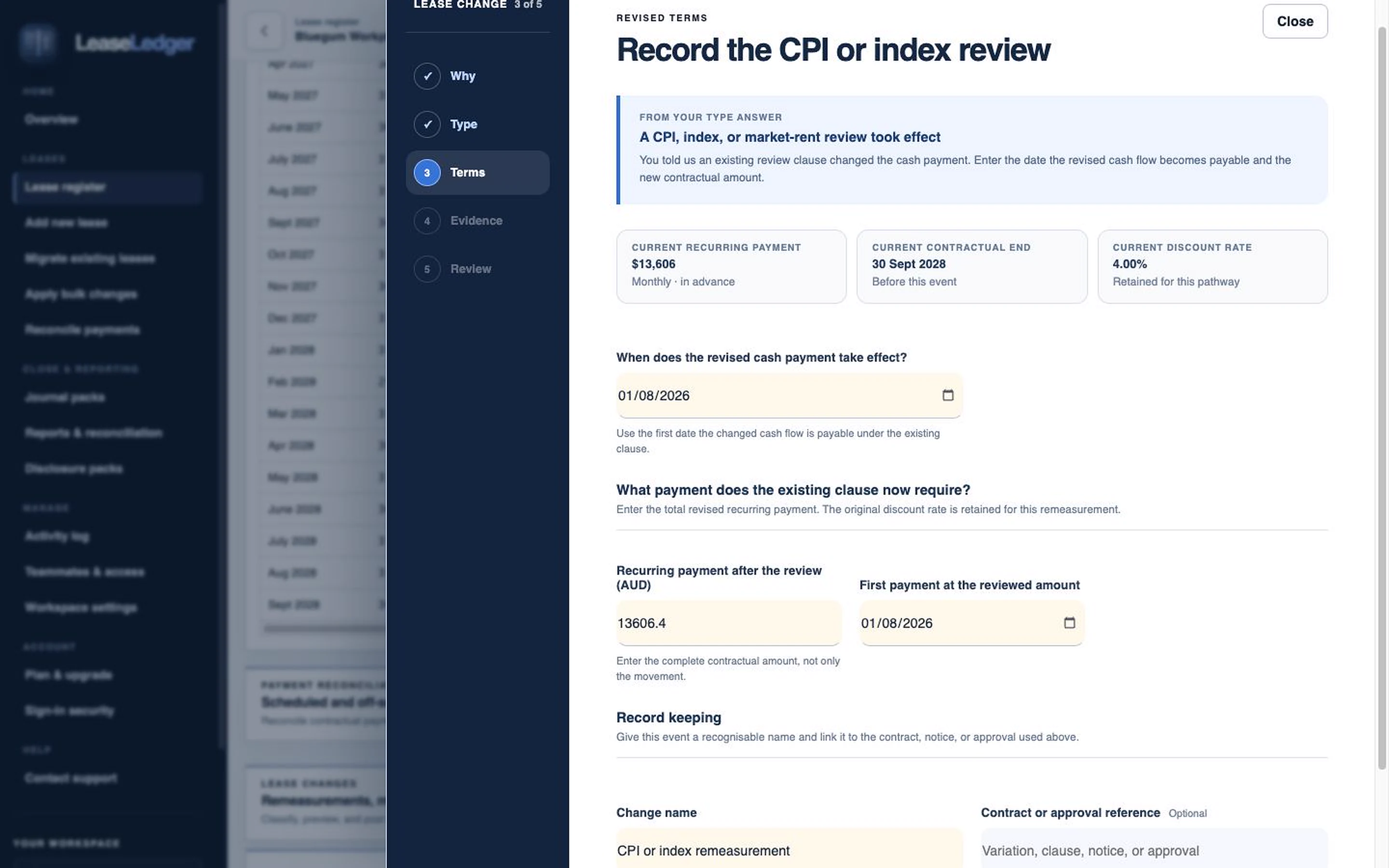
The wizard makes complex lease changes easier by stepping users through the questions that determine the appropriate treatment for the selected accounting standard and scenario.

  • Scenario-led questions guided by the selected standard and lease facts
  • Human confirmation before calculation or posting
LeaseLedger wizard asking why the lease is changing
Guided lease change · 5 controlled steps

Start free or book a demo

Run up to three leases on the full calculation engine with no monthly fee or credit card. Talk to us about Professional when you need higher limits, bulk migrations, and consolidation across entities.

$0 up to 3 leases

  • Full AASB 16 / IFRS 16 / ASC 842 calculation engine
  • Daily-accuracy amortisation schedules
  • Journals and reports
  • Lease modifications and remeasurements
  • 1 client workspace
  • Workspace owner plus 1 teammate
  • Optional AI-assisted lease capture with 5 drafts
  • No credit card required

By creating an account, you agree to the Terms of Service and acknowledge the Privacy Notice.

Talk to us

  • Everything in Free
  • Higher lease limits tailored to your portfolio
  • Additional users
  • Foreign-currency leases
  • Bulk imports and migration workbooks
  • Dedicated single-tenant AWS environments available by arrangement
  • Optional AI assistance with an expanded capture allowance
  • Consolidation and eliminations
  • Impairment testing
  • Support from a qualified accountant

Request a demo and tell us what you'd like to explore

Share your name and email address. Add any portfolio or implementation context you'd like us to cover; we'll use it only to tailor the walkthrough.